Motor Drivers
Blown Fuse
Firmware
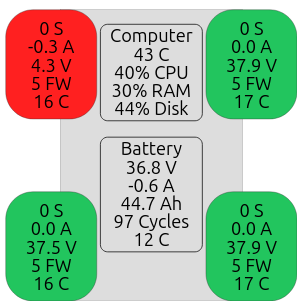
Checking your robots firmware version
Updating
- Open robot
- Disconnect main battery
- Connect laptop to usb-c port on motor driver
- Hold both boot and reset button, release reset, then release boot
- Wait for motor driver to show up as removable drive on laptop
- Copy firmware onto removable drive
- Motor driver will disconnect and update is complete
- Repeat steps 3-8 for all motor drivers.
Downloads
Firmware Ver.7 - Download
- Added serial number identification This allows avvy to know when a motor driver is replaced.
Firmware Ver.6 - Download
- Added support for the 30A current sensor.
- Smoother, more predictable throttle response. Throttle now ramps to the commanded value at a fixed rate rather. The motor also now comes to a firm stop at zero throttle instead of slowly drifting toward it.
- Safer power-up. Fixed a rare startup condition where the motor gates could briefly be driven into a hard-brake state for a moment before the controller finished initializing.
- More reliable I2C status reads. Fixed a timing issue where a status read over I2C could occasionally return invalid data, e.g. erroneous current measurements.
Firmware Ver.5
- Fixed a bug that could disrupt I2C communication.
- Added a watchdog on the main control loop.
- Faster response to lost communication.
- Added over-temperature protection on the driver itself.
Firmware Ver.4
- Added temperature sensor support.
- Improved current limiting.
- Improved speed estimate.
- Smoother throttle response.
- Added a startup LED blink pattern